Windows-native · Access on request

Embedded Linux for AMD FPGAs and Arm processors, built on Windows: IronForge

IronForge builds U-Boot, Linux and applications on a Windows workstation, and the FPGA hardware when the board has one, without PetaLinux, WSL or a Linux virtual machine.

It covers MicroBlaze in AMD FPGAs, the Arm Cortex-A9 and Cortex-A53 in Zynq SoCs, and Arm processors from NXP, ST and Microchip that have no FPGA. Boards share one set of verified sources and use their own drivers and device trees. Five reference boards run today: Linux with 1080p60 HDMI, a MIPI camera and H.264 streaming on the Zybo Z7-20, 720p60 HDMI and audio on the Nexys Video, a networked MicroBlaze system on the Arty A7-100T, a serial-console MicroBlaze system on the Arty S7-50 and a four-core Cortex-A53 system on the NXP i.MX 8M Mini EVK. Each has a demo image to download.

Why build Linux on Windows

  • Embedded Linux without a Linux desktop. Your team builds, flashes and ships Linux from the Windows PCs it already uses.
  • Vendor tools run where they run best. Vivado and the ST and NXP toolchains run directly on Windows, next to the build.
  • Nothing new for IT to manage. No Linux build machine, virtual machine or WSL to approve, patch and secure.
  • One PC to build and debug. Your Windows debuggers, analyzers and terminals sit on the same system that builds Linux.
  • Mainline sources. Linux, U-Boot and BusyBox come from their main releases, with no custom vendor kernel.

Watch the Zybo Z7-20 demo · Flash images · All documents · Pricing and access

Overview

IronForge is a build system for embedded Linux that runs on native Windows. It serves soft processors in AMD FPGAs, the Arm processors in Zynq SoCs and Arm processor boards with no FPGA. On an FPGA board it drives Vivado for the bitstream; on every board it builds the boot loader, U-Boot, Linux, BusyBox and the applications, and packages a root filesystem and flash images. PowerShell commands and optional VS Code actions run each step.

The workflow is written down as tracked commands, so an AI coding assistant such as Claude or Codex can follow it to acquire sources, configure components, build, validate, package images and diagnose the target.

The current builds use Linux 7.3.4, U-Boot 2026.10 and BusyBox 1.38.0 with AMD Vivado and Vitis 2026.1. AMD tools are installed separately; IronForge does not download them or supply their licenses.

How it works

  • Native Windows. PowerShell plus private build helpers. No WSL, Linux VM or container.
  • Verified sources. Downloads are checked against SHA-256 values, and one source tree per component serves every board.
  • Build receipts. Each build step records its inputs, so stale outputs are detected.
  • Two ways to boot. SPI flash, or TFTP with a writable NFS root served from the Windows PC for fast iteration.
  • Configuration menus. Terminal menuconfig for Linux, U-Boot and BusyBox.
  • Whole system. Bitstream, boot loader, U-Boot, kernel, device tree, root filesystem and applications from one tool.

At a glance

HostWindows, PowerShell; VS Code optional
BuildsBitstream, U-Boot, Linux, BusyBox, applications, flash and FIT images
Linux / U-BootLinux 7.3.4, U-Boot 2026.10, BusyBox 1.38.0
AMD toolsVivado and Vitis 2026.1, installed separately
Processors and devicesMicroBlaze, Zynq-7000, Zynq UltraScale+, NXP i.MX 8M Mini and other Arm processors, with five reference boards. Full list
License$1,500 per seat per year, 8 support hours included

Supported processors, devices and boards

IronForge covers soft processors in FPGA logic and hard Arm processors in SoC devices. The same commands, source versions and packaging steps serve each row. The Arm build profiles follow the table, and the four reference boards are in the tabs below.

ProcessorTypeDevice familiesReference designSimilar boards and parts
MicroBlazeSoft processor in FPGA logic: 32-bit, MMU, caches, hardware multiply, divide and floating pointAMD 7 series FPGAs (Spartan-7, Artix-7, Kintex-7, Virtex-7) and UltraScale+ FPGAs (Artix, Kintex and Virtex UltraScale+)Arty S7-50 (XC7S50), Arty A7-100T (XC7A100T) and Nexys Video (XC7A200T): Linux on a 100 MHz MicroBlazeOther 7 series and UltraScale+ parts and boards with external memory, such as the Arty A7-35T, Nexys A7, Genesys 2 and KCU116
Arm Cortex-A9Hard processor, one or two cores, with FPGA logic on the same deviceAMD Zynq-7000 SoC, XC7Z007S through XC7Z100Zybo Z7-20 (XC7Z020): Linux on both cores in 1 GiB of DDR3LOther Zynq-7000 boards, such as the Zybo Z7-10, Arty Z7, Cora Z7, ZedBoard and MicroZed
Arm Cortex-A53Hard processor, 64-bit: two or four cores with FPGA logic in the Zynq UltraScale+, four cores in the i.MX 8M MiniAMD Zynq UltraScale+ MPSoC and NXP i.MX 8M Minii.MX 8M Mini EVK: Linux on four cores in 2 GiB of LPDDR4, booted over USB and Ethernet. Zynq UltraScale+ is supported by a board portZynq UltraScale+ boards, such as the ZCU102, ZCU104, Ultra96-V2 and Kria KV260, and other i.MX 8M Mini boards and modules
Arm Cortex-A7Hard processor, 32-bitST STM32MP1STM32MP157F-DK2 build profileRoadmap
ARM926EJ-SHard processor, 32-bitMicrochip SAM9X60SAM9X60 Curiosity build profileRoadmap
AlteraFPGA and SoC FPGA processorsAlteraRoadmapRoadmap

A reference design is the starting point for another board in the same device family. The port supplies the FPGA part, pin constraints, memory configuration, device tree and flash layout. The measurements on this page apply to the five reference boards; a ported board is qualified on its own hardware. Altera FPGA support is on the roadmap.

Arm processor build profiles

These boards have no FPGA. IronForge builds their boot software, Linux and applications with the same commands.

BoardProcessorAvailable software
Microchip SAM9X60 CuriosityARM926EJ-SLinux, U-Boot, BusyBox, NAND and SD bootstrap, peripheral demos, applications and games have passed software checks.
ST STM32MP157F-DK2Arm Cortex-A7The toolchain, Linux, U-Boot and BusyBox have passed core software checks.
NXP i.MX 8M Mini EVKArm Cortex-A53Reference design: Trusted Firmware-A, U-Boot, Linux and BusyBox run on the EVK, with USB network boot and a microSD image. See the i.MX 8M Mini EVK.

IronForge designs in action

Pick a board. Watch the demo, read the brief and the measurements, then load the flash image and try it on your own board.

Linux on the Zybo Z7-20: 1080p60 HDMI, MIPI camera, H.264

The Zybo Z7-20 design drives a 1080p60 HDMI console from a 32-bit framebuffer in DDR, captures a Pcam 5C camera and streams 1080p30 hardware H.264 over Gigabit Ethernet. Three IronKernel cores sit on the Zynq's DDR ports: IronVideo for the display, IronCapture for the camera and IronH264 for the encoder.

  • The cube demo. ironforge-cube software-rasterizes a rotating 3 × 3 cube into the XRGB8888 framebuffer with a four-voice chip-tune soundtrack. At 1080p60 it ran 6,426 frames in 180 seconds.
  • 1080p60 display. 4,204 frames in 70.07 s with zero underruns; peak DDR fetch 1.158 GB/s. 720p60 ran 3,600 frames with zero underruns.
  • Camera. 120 of 120 frames at 720p30 and 300 of 300 at 1080p30.
  • H.264 streaming. 1,800 of 1,800 pictures at 30.00 pictures/s with the encoder at 121.85 MHz.
  • Network and CPU. TCP 760 Mbit/s into the board and 693 Mbit/s out; CoreMark 2,335.72 iterations/s.

The rotating-cube demo at 1080p60 on the Zybo Z7-20, filmed from the monitor. The flash images for 720p60 and 1080p60 run it on your board.

1080p60 on the Zybo Z7-20 is an engineering mode: the 742.5 MHz serializer clock exceeds the speed-grade −1 clock-network rating of the XC7Z020, and the measurements apply to the tested board and display. 720p60 is the rated mode.

MicroBlaze Linux on the Nexys Video: 720p60 HDMI, audio, Ethernet

A MicroBlaze on the Artix-7 XC7A200T runs Linux with a 720p60 HDMI console, an onboard OLED splash, stereo analog playback and Ethernet. IronVideo drives the monitor through a Linux DRM framebuffer, and the RTLNet MAC provides Ethernet.

  • Display. IronVideo drives a physical HDMI monitor at 1280 × 720 and 60 Hz. U-Boot starts scanout and Linux shows the console or a game on fb0.
  • Audio. mpg123 plays stereo MP3 through ALSA and the onboard ADAU1761 codec at 48 kHz.
  • Ethernet. RTLNet MAC with AXI DMA on a 1 Gb/s link. Under MicroBlaze Linux, TCP measured 15.2 Mb/s into the board and 7.60 Mb/s out.
  • Boot. Warm SPI flash boot reaches the shell in about 56 seconds; TFTP boot with an NFS root is also exercised.
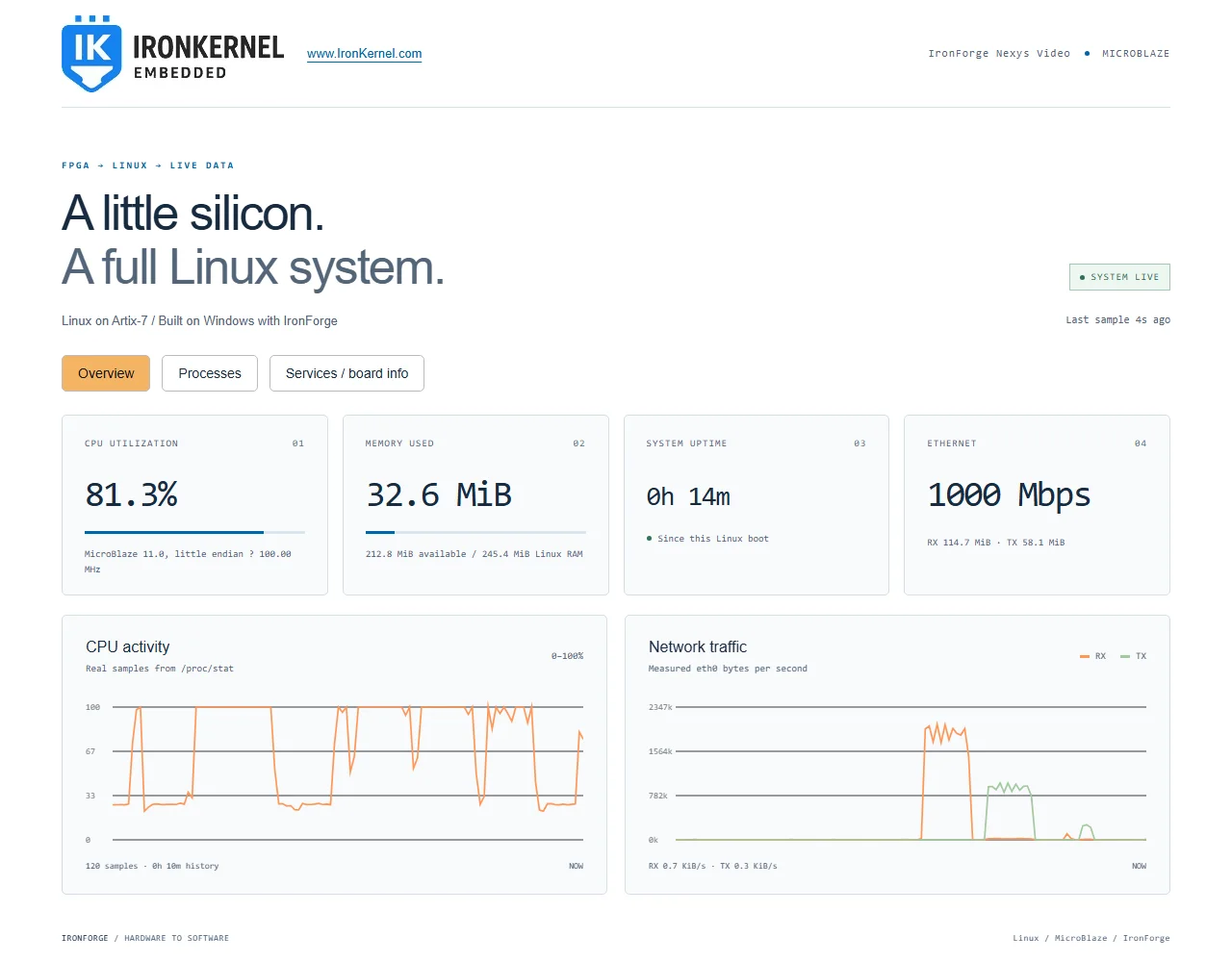
Browser dashboard served by the Nexys Video: CPU load, memory, uptime, a 1000 Mbps Ethernet link and traffic graphs
The dashboard the Nexys Video serves to a browser on the LAN, captured from the board: CPU load, memory, uptime, the Ethernet link rate and traffic.

Prebuilt demos for this board

The first is the IronForge Linux system for this board. The others are bare-metal FPGA images from the core repositories.

MicroBlaze Linux on the Arty A7-100T

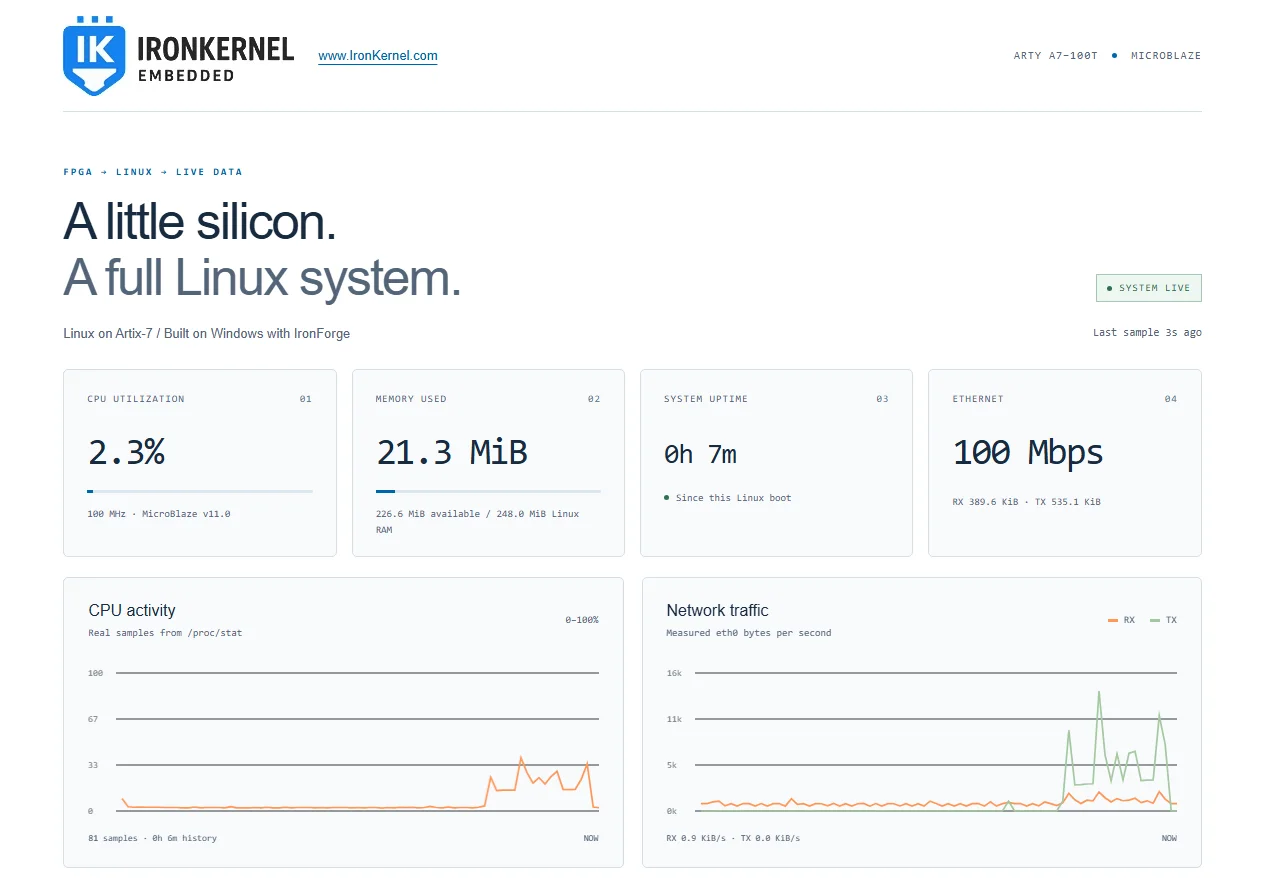
A 100 MHz MicroBlaze with an MMU runs Linux in 256 MiB of DDR3 on the Artix-7 XC7A100T, using AMD catalog IP and EthernetLite at 100 Mb/s. It is the smallest IronForge system and the starting point for a networked control board.

  • Boot. A warm SPI boot reaches the shell 46.5 s after the loader banner. The default root filesystem runs in RAM, and files under /data survive reboot.
  • Services. An HTTP dashboard with a JSON and CSV API, SQLite history and Mosquitto MQTT.
  • Network. iperf measured 5.93 Mb/s into Linux and 6.20 Mb/s out on EthernetLite.
  • Loader. An MIT-licensed loader in block RAM starts U-Boot from SPI flash.
Browser dashboard served by the Arty A7-100T: CPU load, memory, uptime, a 100 Mbps Ethernet link and traffic graphs
The dashboard the Arty A7-100T serves to a browser on the LAN, captured from the board. The MicroBlaze samples its own load, memory and network traffic.

Prebuilt demos for this board

MicroBlaze Linux on the Arty S7-50: a Spartan-7 serial console

A 100 MHz MicroBlaze with an MMU and caches runs Linux 7.3.4 in 256 MiB of DDR3L on the Spartan-7 XC7S50. The console is an AXI UARTLite on the board's USB port at 115200 baud. It is the smallest FPGA in the set and the starting point for a Spartan-7 board.

  • Boot time. 20.45 s from the first loader banner to the BusyBox prompt on an SPI restart, including the five-second U-Boot countdown.
  • Boot flow. The FPGA configures from flash, a first-stage loader in block RAM loads U-Boot 2026.10, and U-Boot reads the kernel, device tree and an LZ4 RAM filesystem from SPI.
  • Flash. One 16 MiB image for the QSPI NOR, with two 64 KiB U-Boot environment sectors. A saved setting was verified after a restart.
  • Bring-up. JTAG loads the FPGA design and the three RAM payloads through the programming cable, with no flash write.
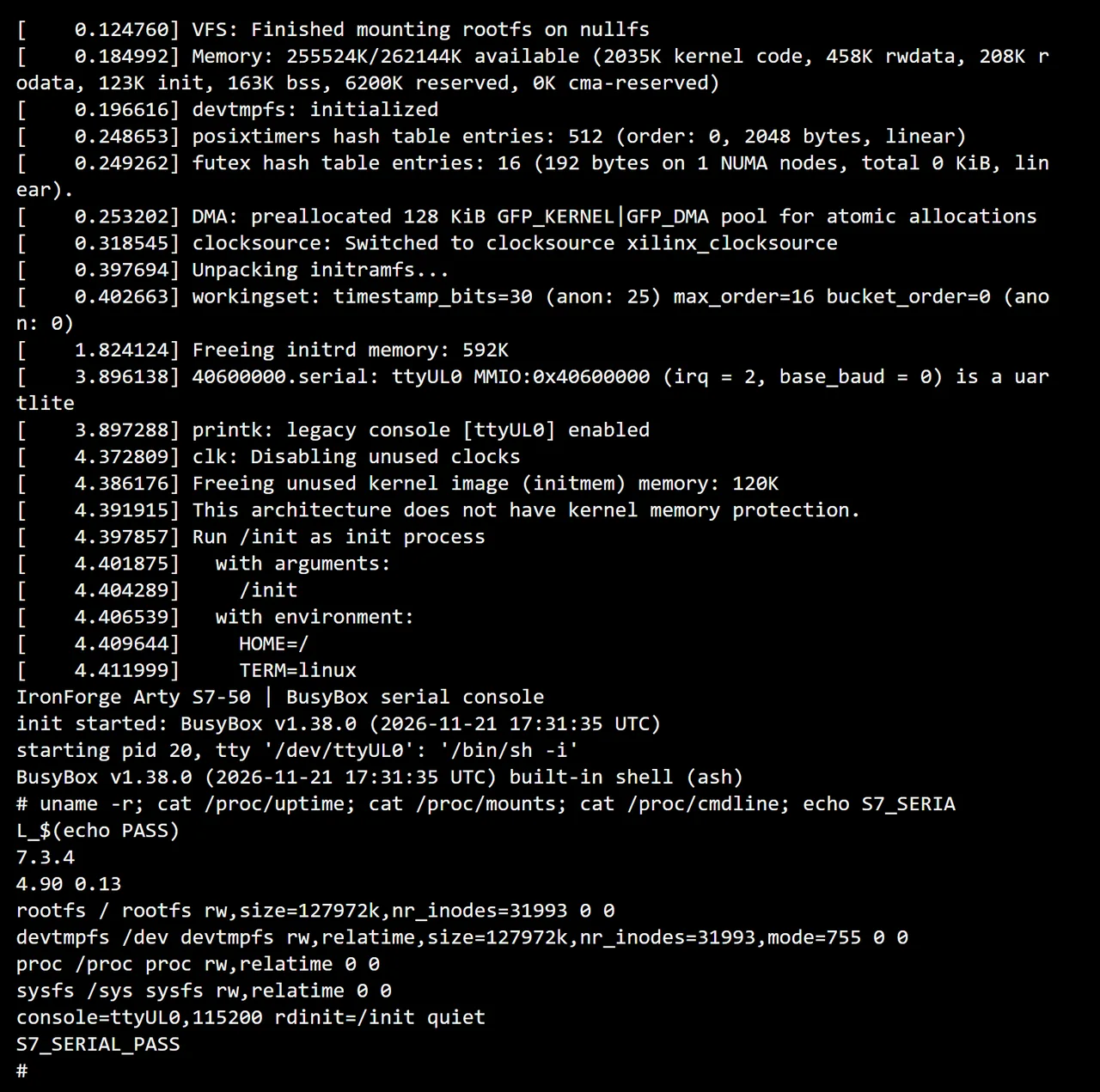
Serial console of the Arty S7-50: Linux unpacks the RAM filesystem and BusyBox opens a shell
The Arty S7-50 USB serial console during a boot from SPI flash: the RAM filesystem unpacks and the BusyBox shell starts.

Linux on the NXP i.MX 8M Mini EVK: Four Cortex-A53 cores, booted over USB and Ethernet

This board has no FPGA. IronForge builds Trusted Firmware-A 2.12.0, U-Boot 2026.10, Linux 7.3.4 and BusyBox 1.38.0 for the i.MX 8M Mini Quad on Windows. The EVK loads U-Boot into RAM over USB, fetches the kernel and device tree over TFTP and mounts its root filesystem over NFS from the Windows PC. The build also produces a microSD image for standalone boot.

  • Ethernet. TCP 943 Mb/s into the board and 947 Mb/s out on the gigabit link. U-Boot loads the 14 MB kernel over TFTP at 5.9 MiB/s.
  • Processor. Four CoreMark workers, one per core, measured 3,090 to 3,911 iterations/s each.
  • Storage. The eMMC runs in HS400 enhanced strobe mode: 308.61 MiB/s sequential read and 79.18 MiB/s write at a 1 MiB block size. Linux also identifies the microSD card and the 32 MiB QSPI NOR.
  • Wi-Fi. The onboard QCA9377 radio scans 2.4 GHz and 5 GHz while the root stays mounted over Ethernet.
  • Applications. A browser dashboard served by the board, SQLite, iperf3, an MQTT broker, SSH and audio playback through the WM8524 codec.
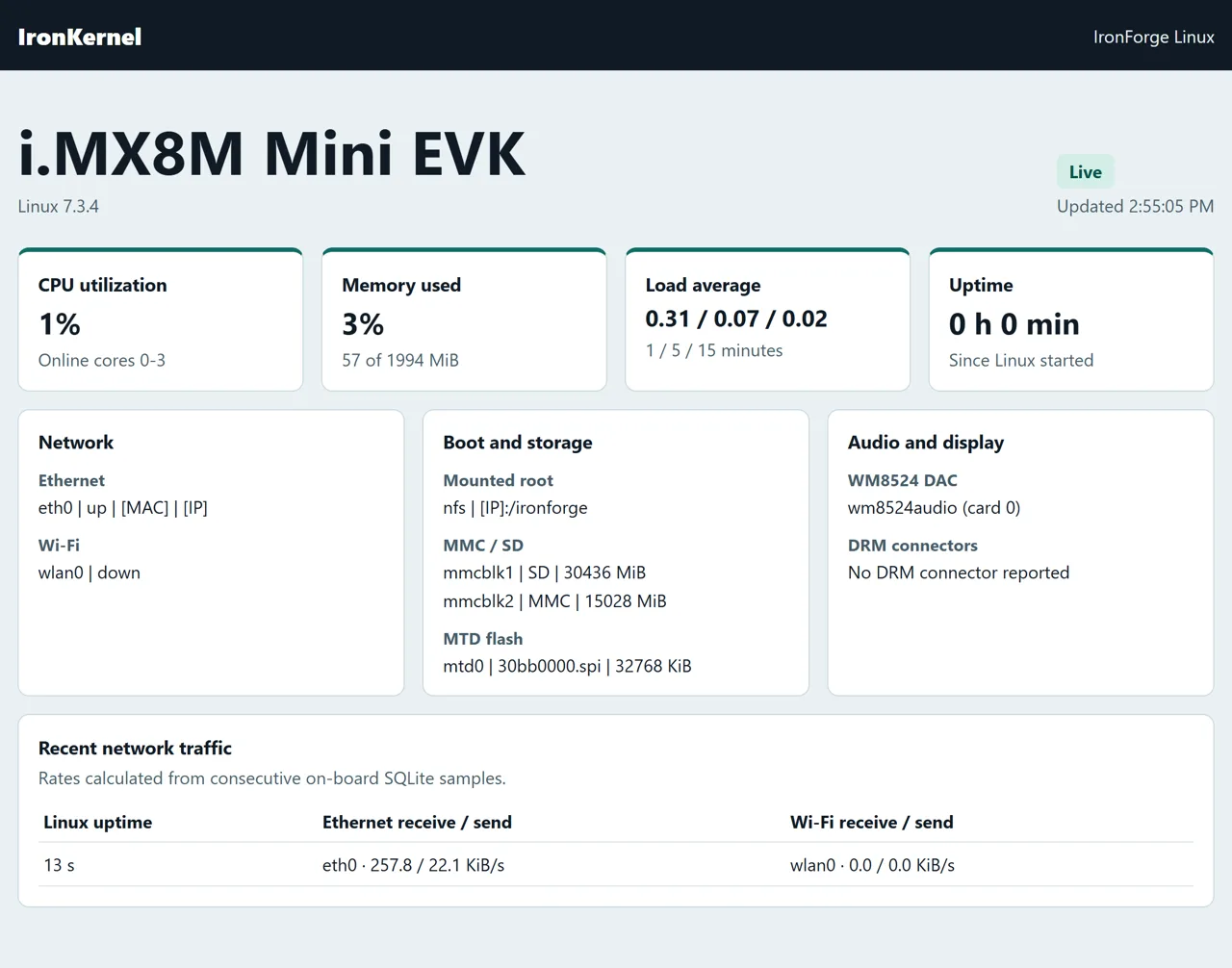
Browser dashboard served by the i.MX 8M Mini EVK: four CPU cores, memory, Ethernet, the NFS root, eMMC, microSD and QSPI flash
The dashboard the i.MX 8M Mini EVK serves over Ethernet, with Linux running from the NFS root. Network addresses are masked.

Download the demo images

Each FPGA reference design has a complete flash image: FPGA configuration, boot loader, U-Boot, Linux and the root filesystem in one file. The i.MX 8M Mini EVK has a USB network boot bundle. Nothing has to be built. Pick a board.

Zybo Z7-20, 720p60

16 MiB QSPI

Boots to a BusyBox shell on the HDMI monitor and the USB serial port. ironforge-cube runs the rotating cube with stereo audio.

720p60 is the rated HDMI mode. Runs with Ethernet unplugged and no SD card.

SHA-256: df68719ad1a18205630100a6742455ffac54686e4084df441aa5f48a0ff8b739

8.6 MBZip: image, JTAG helpers, guide, notices Download

Zybo Z7-20, 1080p60

16 MiB QSPI

The same system with 1920 × 1080 at 60 Hz as the HDMI default.

1080p60 is an engineering mode: it exceeds the FPGA serializer speed-grade rating.

SHA-256: b6f85158b794cf19d0d28e2078e7a62e29d3c487e1b571eb127611c53d73bf71

8.6 MBZip: image, JTAG helpers, guide, notices Download

Nexys Video

32 MiB QSPI

MicroBlaze Linux with a 1280 × 720 HDMI console. ironforge-game starts a game from the shell.

On a trusted LAN with DHCP the board serves its dashboard to a browser. Files under /data survive a reboot.

SHA-256: f98c79934846f4ea25f86fda95882e6a190f7388632f0b40ff5571ae0bbbe5c5

9.5 MBZip: image, run guide, notices Download

Load it on a Nexys Video

  1. Connect power and the USB JTAG/UART port, select Master SPI boot and connect a monitor to HDMI OUT.
  2. Add the configuration memory device for your board; for the S25FL256S it is s25fl256sxxxxxx0-spi-x1_x2_x4.
  3. In the Vivado Hardware Manager choose Program Configuration Memory Device, select the image and the entire device, and enable erase, blank check, program and verify.
  4. Open the USB serial console at 115200 8N1 and power-cycle the board.
  5. At the shell run ironforge-game. For the dashboard, connect Ethernet to a trusted LAN with DHCP and open the address shown on the console.

Arty A7-100T

16 MiB QSPI

MicroBlaze Linux with a BusyBox shell on the USB serial port. ironforge-game starts a terminal game.

On a trusted LAN with DHCP the board serves its dashboard and a demonstration MQTT broker, both without authentication.

SHA-256: 27629bcab652b45211e1e3bc19a39099904dca5d870493a91dffd92385aa4d6a

10.1 MBZip: image, run guide, notices Download

Load it on an Arty A7-100T

  1. Connect the PROG/UART USB port and fit JP1 for SPI boot.
  2. Add the configuration memory device for your board; for the S25FL128S it is s25fl128sxxxxxx0-spi-x1_x2_x4.
  3. In the Vivado Hardware Manager choose Program Configuration Memory Device, select the image and the entire device, and enable erase, blank check, program and verify.
  4. Open the serial terminal at 115200 8N1 and power-cycle the board.
  5. Type ironforge-game to start the game; lowercase q quits.

Arty S7-50

16 MiB QSPI

MicroBlaze Linux on a Spartan-7. The board cold-boots to a BusyBox shell on the USB serial port.

The image runs offline: no network, boot server or login key.

SHA-256: c86e027cd719f53d2fb9e50e25e8cb397abcd0378e3b9e85aabbc02bd39733fd

2.5 MBZip: image, run guide, checksum, notices Download

Load it on an Arty S7-50

  1. Connect the PROG/UART port J10 over USB and select Master SPI boot.
  2. Add the configuration memory device for your board; for the S25FL128S it is s25fl128sxxxxxx0-spi-x1_x2_x4.
  3. In the Vivado Hardware Manager choose Program Configuration Memory Device, select the image and the entire device, and enable erase, blank check, program and verify.
  4. Open the USB UART at 115200 8N1, power-cycle the board and let the five-second U-Boot countdown expire.
  5. At the prompt run uname -r; it prints 7.3.4.

i.MX 8M Mini EVK

USB network boot

This demo does not write the board's flash. U-Boot loads into RAM over USB, and Linux runs from an NFS root on your Windows PC.

The bundle holds the boot image, the root filesystem, the Windows NFS server and the license notices. It needs NXP's DDR training firmware, which you download from NXP under NXP's license.

SHA-256: c86cb5cd208bda71b030ade505fc97a5c6c41c712ae7747aacedfc66ca3730cb

13.1 MBZip: boot image, root filesystem, NFS server, guide, notices Download

Run it on an i.MX 8M Mini LPDDR4 EVK

  1. Unpack the bundle and complete the boot image with NXP's firmware-imx-8.10 DDR training files.
  2. Connect the EVK and the PC to the same network and start the demo's TFTP and NFS server on the PC.
  3. Set the boot switches to Download Mode, connect the USB data and debug cables, and open the A53 serial port at 115200 8N1.
  4. Send the boot image with NXP's uuu tool and stop U-Boot at its countdown.
  5. Enter the generated network boot commands. Linux mounts the NFS root, and the dashboard opens at the board's address.

Programming a full image replaces everything in the board's flash, including saved U-Boot settings. The Arty S7-50, Arty A7-100T and Nexys Video images are written with Program Configuration Memory Device in the Vivado Hardware Manager, which runs under Vivado's free license. The Zybo Z7-20 zip includes the XSDB helpers and a step-by-step guide. No image holds an SSH host key or a login key; the Zybo image generates its host key in RAM on each boot. The demo license allows running an image on its board for evaluation and demonstration, and passing on the complete, unmodified package at no charge.

Documentation

One brief per board, plus the product overview. The system specification is an earlier edition, kept as an archive.

DocumentContentsOpen
IronForge product briefThe processors and device families, and what works on each reference boardPDF
Zybo Z7-20 board brief1080p60 HDMI, the cube demo, Pcam 5C camera, H.264 streaming, boot and network measurementsPDF
Nexys Video board brief720p60 HDMI, OLED, audio, RTLNet Ethernet, boot flow and measurementsPDF
Arty A7-100T board briefMicroBlaze Linux, flash layout, dashboard, MQTT and measurementsPDF
Arty S7-50 board briefMicroBlaze Linux on a Spartan-7: boot flow, the 20.45 s boot measurement and the serial console tracesPDF
i.MX 8M Mini EVK platform briefLinux on the NXP i.MX 8M Mini: USB and network boot, Ethernet, eMMC and CoreMark measurements, Wi-Fi scan and the dashboardPDF
System specification (archive)Archive: November 16, 2026 edition. It predates the Zybo Z7-20 design; the board briefs are current.PDF
ArticleBuilding Embedded Linux for an FPGA Board on Windows. What it takes to build the bitstream, U-Boot, the kernel and a root filesystem on a Windows PC, and how three AMD boards boot from it.Read

Pricing and access

IronForge is licensed per seat per year, in USD. Each seat includes 8 hours of IronKernel support per year.

Enterprise

Multiple seats for a team or a site, with support hours pooled across the seats.

By quoteMultiple seats Contact Us

Your board

We bring IronForge up on your AMD FPGA or Zynq board: bitstream, U-Boot, device tree, drivers and a flash image, under a fixed-price contract.

Fixed priceBoard bring-up Contact Us

The IronForge repository is private and access is granted on request. AMD Vivado and Vitis are licensed separately by AMD. The IronKernel cores in the board designs (IronVideo, IronCapture, IronH264, RTLNet) are licensed separately for products; see each core's page.

Questions and answers

Does IronForge need WSL, a Linux virtual machine or PetaLinux?

No. IronForge runs on native Windows with PowerShell and its own private build helpers. No WSL, Linux VM or container is required, and it does not use PetaLinux. AMD Vivado and Vitis are installed separately under your own AMD license.

Which FPGAs and boards does IronForge support?

IronForge supports the MicroBlaze soft processor on AMD 7 series and UltraScale+ FPGAs, the Arm Cortex-A9 in Zynq-7000 SoCs and the Arm Cortex-A53 in Zynq UltraScale+ SoCs. Five reference designs are built and measured: the Digilent Arty S7-50 (MicroBlaze on Spartan-7), the Arty A7-100T and Nexys Video (MicroBlaze on Artix-7), the Zybo Z7-20 (Zynq-7000) and the NXP i.MX 8M Mini EVK (four Arm Cortex-A53 cores, no FPGA). Each has a demo image to download. Another board in the same family is a port from its reference design. Build profiles exist for two more Arm boards. Altera FPGA support is on the roadmap.

What does IronForge build?

The FPGA bitstream, the boot loader, U-Boot, the Linux kernel, BusyBox and applications, then a root filesystem, SPI flash images and FIT images. It also serves TFTP boot and a Windows NFS root for development.

How is IronForge licensed?

$1,500 per seat per year, which includes 8 hours of IronKernel support per year. Enterprise licenses cover multiple seats. The repository is private; access is granted on request.

Cores in the IronForge board designs

More from IronKernel

The IP cores, the IronForge Linux build tool and the reference designs work together.

IP Cores

FPGA cores and embedded firmware for video, cameras, networking and system management. Each core has a specification, recorded test results and a published price, and a prebuilt demo where a board can show it.

From $2,500One-time license, free evaluation See the IP cores

Reference designs

IronForge Linux on four AMD FPGA boards and the NXP i.MX 8M Mini EVK, and the IronKernel 64 SID music machine. Each has a brief and a prebuilt demo to load.

FreePrebuilt images See the reference designs

Build Linux for your FPGA board on Windows

Send your target board and project goal. We reply with access details or a bring-up proposal.